From a worker perspective
See what tasks need to be done instantly
See what tasks need to be done instantly
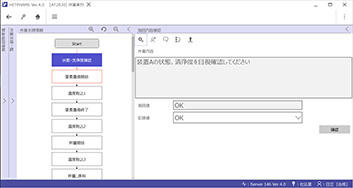
- Work can be performed by following procedures and confirming task details.
- Worker names and task execution times are recorded and reflected in the work progress status.
- This reduces worker burden and enables workers to obtain reliable task execution records.
Easy to use with a clear display
Easy to use with a clear display
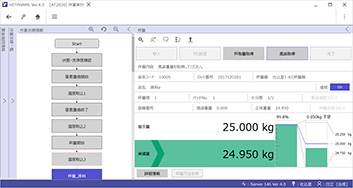
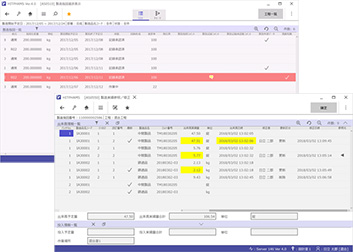
- The system connects to various weighing instruments and enables work to be performed according to weighing procedures.
- The system performs upper/lower limit checks on actual quantities against specified quantities, and displays results clearly with colors and meters.
- Conversion of specified quantities can be performed as needed based on raw material test results.
Easy-to-understand SOP definitions
Easy-to-understand SOP definitions
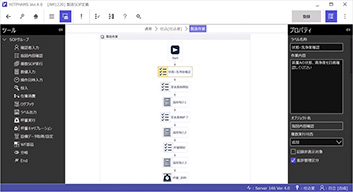
- Master definition, the most difficult part of systemization, is represented as a flowchart. Users can define work procedures using flowcharts and place SOP objects by drag-and-drop.
- After master registration, master consistency checks can be performed by MBR or table.
From a management perspective
Work progress is visible at a glance
Work progress is visible at a glance
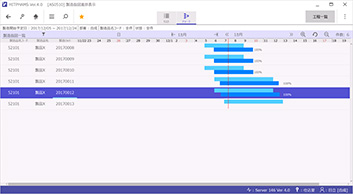
- Visible work progress makes it easier to check schedules and anticipate work changes, etc.
Ensures reliable manufacturing record checks
Ensures reliable manufacturing record checks
- Target rows are color-coded based on work progress status, allowing users to instantly identify comments on instructions, comments during work task execution, and tasks with deviations.
- Users can verify that work record corrections have been made appropriately. Once all corrected records are verified, manufacturing records can be approved.
From the shared perspective of workers and management
Notification of necessary tasks
Notification of necessary tasks
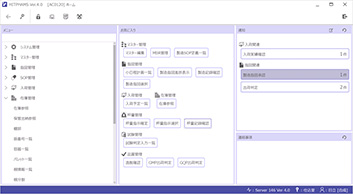
- In addition to menu items, the home screen displays favorites and notifications, allowing a workflow where users can proceed directly to the screens where they need to perform tasks.
Access the same information in multiple languages
Access the same information in multiple languages
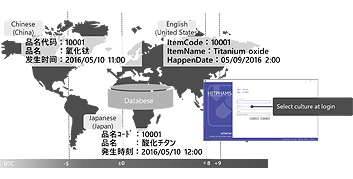
- System integration enables users to view the same information in multiple languages for globalized production sites.
Test record sheet
Test record sheet
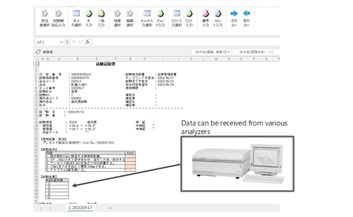
- Users can conduct tests and record results while confirming test procedures on an Excel-based worksheet. Test results are calculated automatically, and test evaluations performed based on data input.
- *Excel is a trademark or registered trademark of Microsoft Corp. in the United States and other countries.
- *Other company names, product names, etc. are registered trademarks or trademarks of their respective companies.