



HIRT-PUB17008 : Security Alert: Ransomware WannaCry

Last Update: October 10, 2017
1. Overview
Beginning from May 13, 2017, the ransomware WannaCry (also known as WannaCrypt, WanaCrypt0r, WCrypte, and WCRY) has been active in the wild. WannaCry exploits a vulnerability in Windows SMBv1 (vulnerability CVE-2017-0145, addressed by security update MS17-010), which allows remote code execution. The ransomware spreads like a network worm to infect other Windows systems with this vulnerability.
1.1 Ransomware behavior
As shown in Figure 1, WannaCry is ransomware that functions like a network worm. After infecting a vulnerable Windows system, it encrypts files and demands payment in exchange for decrypting the files. As of March 16, 2017, no function that causes information leakage has been reported.
(1) Activities that check the network environment
WannaCry attempts to access a site, such as www[.]iuqerfsodp9ifjaposdfjhgosurijfaewrwergwea[.]com, which is used to check whether WannaCry should continue its operations. If the access is successful, WannaCry stops. Because access to the URL causes the operations to stop, this arrangement is also called a kill switch. Since May 15, there have been reports that some versions of this ransomware have the kill switch disabled.
(2) Dropper activities
This malware drops new executable and dll files as the necessary cyber attack resources that enable further diffusion and ransom activities.
(3) Diffusion activities
This malware attempts to propagate itself via SMB1 vulnerability attacks. In the process of propagating itself, the malware establishes an SMB1 connection between the infected system and the system to be infected. After this, the malware checks whether the vulnerability addressed by MS17-010 is present, prepares the cyber attack payload, checks whether the backdoor Double Pulsar is present, and completes its activities by executing the cyber attack payload.
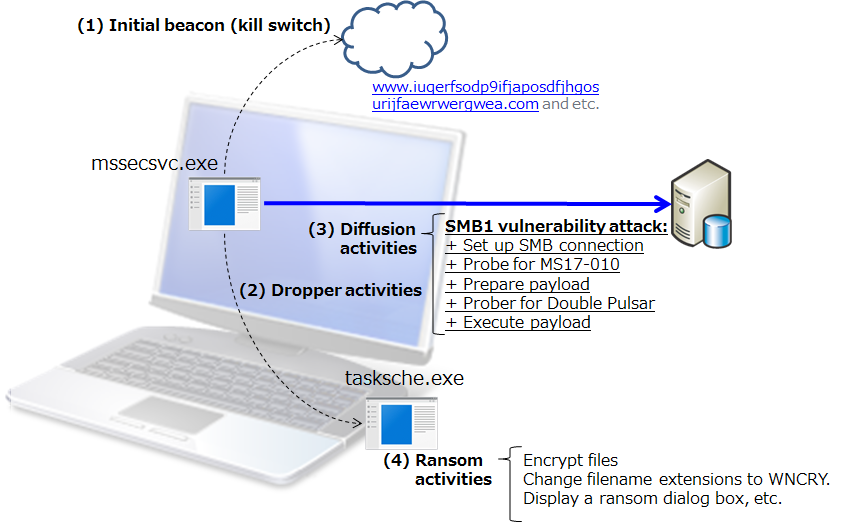 Figure 1: Overview of execution activities
(4) Ransom activities
The malware performs its ransom activities by encrypting files and changing their filename extensions to WNCRY. In addition, a ransom dialog box like the one in Figure 2 is displayed.
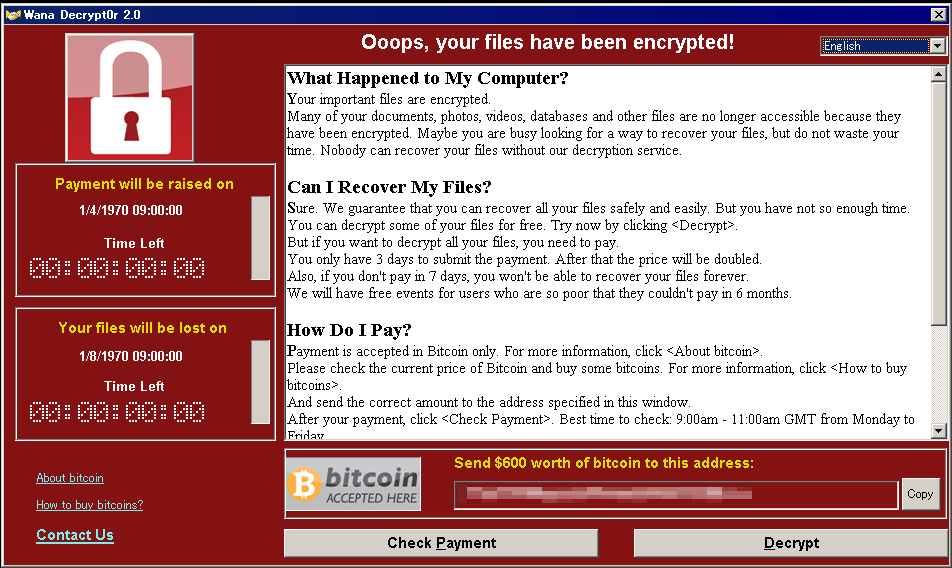 Figure 2: Ransom dialog box
1.2 Incidents
May 13, 2017
Kaspersky: More than 45,000 attacks of the WannaCry ransomware in 74 countries around the world
WannaCry ransomware used in widespread attacks all over the world
https://securelist.com/blog/incidents/78351/wannacry-ransomware-used-in-widespread-attacks-all-over-the-world/
US-CERT: Infections in 74 countries, including the United States, United Kingdom, Spain, Russia, Taiwan, France, and Japan.
Indicators Associated With WannaCry Ransomware
https://www.us-cert.gov/ncas/alerts/TA17-132A
UK NHS (National Health Service): At least 16 organizations were adversely affected.
Statement on reported NHS cyber attack
https://digital.nhs.uk/article/1491/Statement-on-reported-NHS-cyber-attack
Wcrypt Tracker
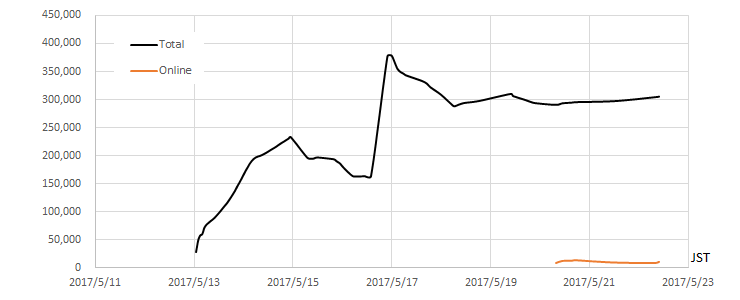 Figure 3: Wcrypt Tracker (Total number of unique IP addresses) (Source: malwaretech.com)
May 13, 2017
Hitachi: Damages Caused by Ransomware, and Status of Recovery
https://www.hitachi.com/New/cnews/month/2017/05/170517a.html
1.3 Security alerts
Various organizations have issued the following security alerts.
US-CERT
Multiple Ransomware Infections Reported (May 13, 2017)
https://www.us-cert.gov/ncas/current-activity/2017/05/12/Multiple-Ransomware-Infections-Reported
US-CERT
Indicators Associated With WannaCry Ransomware (May 13, 2017)
https://www.us-cert.gov/ncas/alerts/TA17-132A
JPCERT/CC
JPCERT-AT-2017-0020: Alert regarding ransomware "WannaCrypt" (May 14, 2017) (May 14, 2017)
http://www.jpcert.or.jp/english/at/2017/at170020.html
IPA
About vulnerability countermeasures for Microsoft products that are being exploited by ransomware infection in the wild (May 14, 2017) (May 14, 2017)
http://www.ipa.go.jp/security/ciadr/vul/20170514-ransomware.html
ICS-CERT
ICS-ALERT-17-135-01: Indicators Associated With WannaCry Ransomware (May 15, 2017)
https://ics-cert.us-cert.gov/alerts/ICS-ALERT-17-135-01
1.4 Wannacry Analysis
WCry/WanaCry Ransomware Technical Analysis (May 14, 2017)
https://www.endgame.com/blog/wcrywanacry-ransomware-technical-analysis
WanaCryptor File Encryption and Decryption (May 15, 2017)
https://modexp.wordpress.com/2017/05/15/wanacryptor/
2. Countermeasures
2.1 Restore or decrypt files encrypted by ransomware
Periodically backup your files and store them at offline as preparation for restoring encrypted files in incident.
2.2 Protect your system from ransomware infection
2.2.1 Vulnerability countermeasures (Keep your operating system and software up-to-date with the latest patches)
Microsoft reports that WannaCry attacks Windows 7, Windows Server 2008, and earlier versions of Windows and Windows Server that have the same vulnerability.
WannaCrypt ransomware worm targets out-of-date systems
https://blogs.technet.microsoft.com/mmpc/2017/05/12/wannacrypt-ransomware-worm-targets-out-of-date-systems/
Windows Vista, Windows Server 2008, Windows Server 2008 R2, Windows 7, Windows 8.1, Windows Server 2012, Windows Server 2012 R2, Windows RT 8.1, Windows 10, and Windows Server 2016
Apply the security update MS17-010, released by Microsoft in March 2017.
Microsoft Security Bulletin MS17-010: Security Update for Microsoft Windows SMB Server (4013389)
https://technet.microsoft.com/en-us/library/security/ms17-010.aspx
Windows Server 2003, Windows XP, Windows XP Embedded, and Windows 8
Apply the security update released by Microsoft as an emergency measure.
Customer Guidance for WannaCrypt attacks
https://blogs.technet.microsoft.com/msrc/2017/05/12/customer-guidance-for-wannacrypt-attacks/
2.2.2 Malware countermeasures
Maintain up-to-date anti-virus software, and scan all software downloaded from the internet prior to executing it.
Kaspersky
WannaCry ransomware used in widespread attacks all over the world (May 12, 2017)
https://securelist.com/blog/incidents/78351/wannacry-ransomware-used-in-widespread-attacks-all-over-the-world/
Symantec
What you need to know about the WannaCry Ransomware (May 12, 2017)
https://www.symantec.com/connect/blogs/what-you-need-know-about-wannacry-ransomware
Trend Micro
Massive WannaCry/Wcry Ransomware Attack Hits Various Countries (May 13, 2017)
https://blog.trendmicro.com/trendlabs-security-intelligence/massive-wannacrywcry-ransomware-attack-hits-various-countries/
RANSOM_WANA.A (May 13, 2017)
https://www.trendmicro.com/vinfo/us/threat-encyclopedia/malware/RANSOM_WANA.A
RANSOM_WCRY.I (May 13, 2017)
https://www.trendmicro.com/vinfo/us/threat-encyclopedia/malware/RANSOM_WCRY.I
Microsoft
WannaCrypt ransomware worm targets out-of-date systems (May 12, 2017)
https://blogs.technet.microsoft.com/mmpc/2017/05/12/wannacrypt-ransomware-worm-targets-out-of-date-systems/
Ransom: Win32/WannaCrypt (May 12, 2017)
https://www.microsoft.com/security/portal/threat/encyclopedia/Entry.aspx?Name=Ransom:Win32/WannaCrypt
McAfee
Protecting against Ransom-WannaCry (May 2017) (May 12, 2017)
https://kc.mcafee.com/corporate/index?page=content&id=KB89335
Further Analysis of WannaCry Ransomware (May 14, 2017)
https://securingtomorrow.mcafee.com/mcafee-labs/analysis-wannacry-ransomware/
When Symantec Endpoint Protection detects a cyber attack targeting the vulnerability (SMB1), the following alarm dialog box pops up (Figure 4).
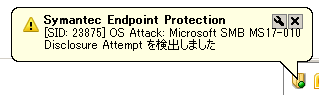 Figure 4: Symantec popup alert dialog of a cyber attack detection
2.2.3 Workarounds
WannaCry randomly probes IPv4 addresses on the Internet, and tries to infect them. The following workarounds might be helpful in protecting your system from network-based attacks (that is, prevent the malware from exploiting CVE-2017-0145, addressed by MS17-010).
Disable SMB1 (Server Message Block v1)
Microsoft Security Bulletin MS17-010: Security Update for Microsoft Windows SMB Server (4013389)
https://technet.microsoft.com/en-us/library/security/ms17-010.aspx#ID0E3SAG
How to enable and disable SMBv1, SMBv2, and SMBv3 in Windows and Windows Server
https://support.microsoft.com/en-us/help/2696547
Blocking SMB port 445
WannaCrypt ransomware worm targets out-of-date systems
https://blogs.technet.microsoft.com/mmpc/2017/05/12/wannacrypt-ransomware-worm-targets-out-of-date-systems/
3. Hitachi Product Information
Hitachi products using Microsoft Windows operating systems are affected to this issue.
HIRT recommends that the following measures are effective in your network environment such as information systems, healthcare systems, industrial control systems and etc. to prevent Ransomware WannaCry.
- Restricting unauthorized access to the network and networked devices.
- Making certain appropriate antivirus software and firewalls are up-to-date.
- Monitoring network activity for unauthorized use.
- Protecting individual network components through routine and periodic evaluation, including updating security patches and disabling all unnecessary ports and services.
- Developing and evaluating strategies to maintain critical functionality during adverse conditions.
4. References
4.1 Malware sample
Wannacry
SHA256:24d004a104d4d54034dbcffc2a4b19a11f39008a575aa614ea04703480b1022c
MD5:db349b97c37d22f5ea1d1841e3c89eb4
4.2 Network environment check activities
WannaCry inquiries the IP address of network environment check site to the DNS server set up on the infected PC. After that, if HTTP access to the network environment check site is succeed, it stops its activity (diffusion and ransome activities). At the additional investigation, we confirmed that WannaCry stops the those activities if it receive the HTML reponse such as "HTTP/1.1 200 OK" or "HTTP/1.1 403 Forbidden" (Figure5). Note that, for the additional investigation, we configured the network environment check site (192.168.20.80) on the network shown in Figure 6.
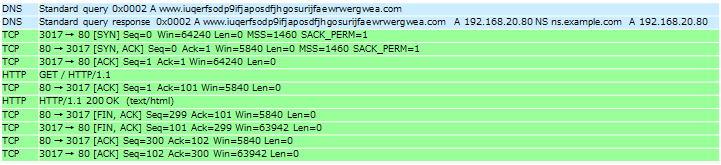 Figure 5: HTTP access to the network environment check site
4.3 Diffusion activities
WannaCry was executed on an infected PC in the network environment shown in Figure 6. The following presents the results of an investigation into the probe method of new PCs for infection as characteristic of a network worm.
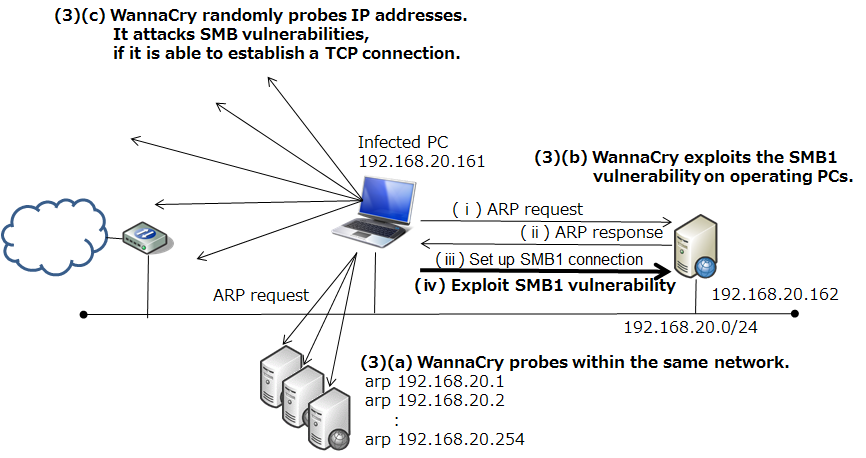 Figure 6: Network environment for investigation of WannaCry's diffusion activities
WannaCry on the infected PC (192.168.20.161) uses ARP packets to probe other operating PCs in the same network ((3)(a)). Next, it launches a cyber attack against the PC that returned an ARP response (192.168.20.161). At the same time, it also begins to probe random the IP address. The WannaCry operates with the assumption that its activities will be performed over an intranet, and as shown in Figure 7, it starts infecting the PC that returned an ARP response (192.168.20.162) within about one minute.
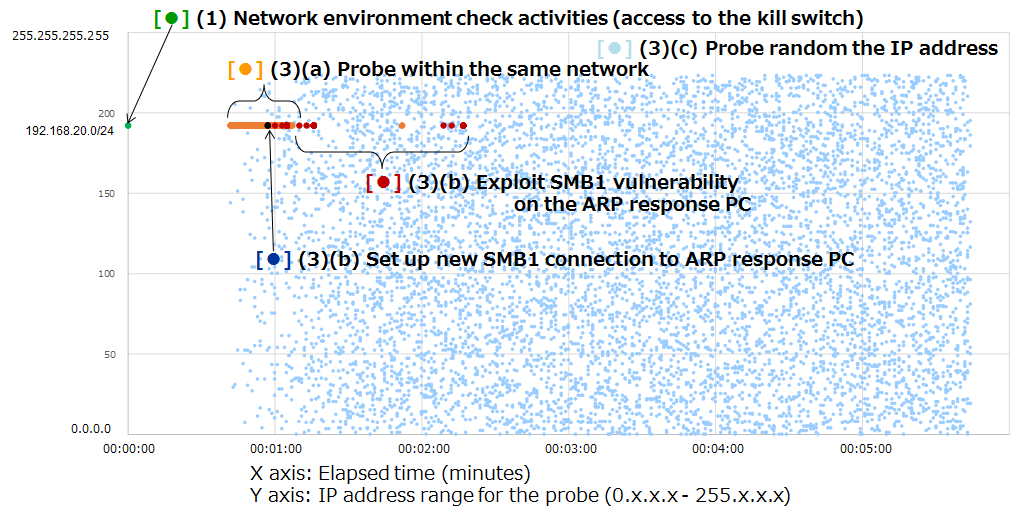 Figure 7: Generation distribution of IP addresses probed by the diffusion activities of WannaCry
Figure 8 shows the network probe patterns used by two malware of the early 2000s: CodeRed3 (2002), and Slammer (2002) within a similar network environment. These graphs show the results for the first 10,000 packets from the start of observation. CodeRed3 primarily probed IP addresses in close proximity to the IP address of the infected PC, and Slammer probed a completely random IP address.
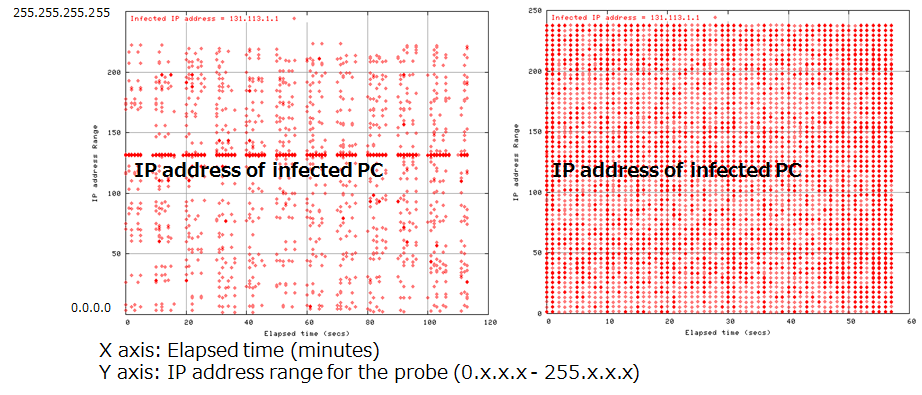 Figure 8: Generation distribution of IP addresses probed by the diffusion activities of CodeRed3 (left) and Slammer (right)
The following figure, Figure 9, shows the speeds with which WannaCry, CodeRed3, and Slammer probe new IP addresses. The probing performance of WannaCry is not particularly high, and it is likely that WannaCry operates with the assumption that its activities will be performed over an intranet, as a result to increase the speed of its diffusion.
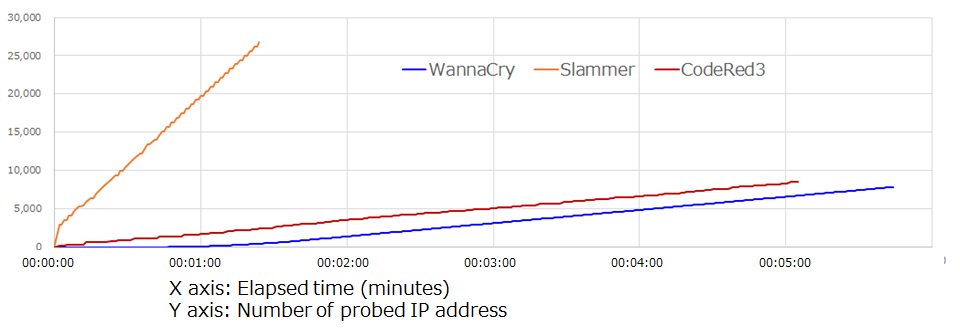 Figure 9: IP address search speeds
Note that, if the subnet mask is /24, WannaCry probes IP addresses of operating PCs within the same network in the following pattern: x.x.x.1, x.x.x.2 ... x.x.x.254. If the subnet mask is /16, WannaCry probes IP addresses in the following pattern: x.x.0.1, x.x.1.1 ... x.x.255.1, x.x.0.2, x.x.1.2 ... x.x.255.2. Because of this, WannaCry's diffusion activities are less efficient when a wider subnet mask is used. On the other hand, because using a wider subnet mask means that many packets must be continued to transmit, this also increases the possibility that normal communications will be disturbed.
4.4 SMB1 vulnerability attack
WannaCry uses three SMB connections during SMB 1 vulnerability attack. SMB connections flow containing the IP address (192.168.20.161) of infected PC (Figure 10) and two IP addresses (192.168.56.20, 172.16.99.5)(Figure 11 and Figure 12) hardcoded in the malware body.
Normal systems which is not infected with Double Pulsar, respond with a "Not Implemented" message and a "Multiplex ID" 65 (0x41) against a "trans2 SESSION_SETUP" request. On the other hand, infected systems respond with a "Not Implemented" message and a "Multiplex ID" 81 (0x51). Also the right side of Figure 12 shows Metasploit(ms17_010_eternalblue.rb) flow for comparison.
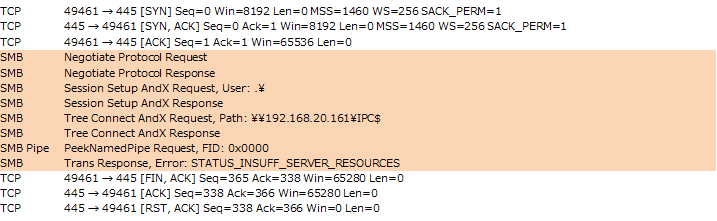 Figure 10: SMB connection flows containing the IP address (192.168.20.161) of infected PC
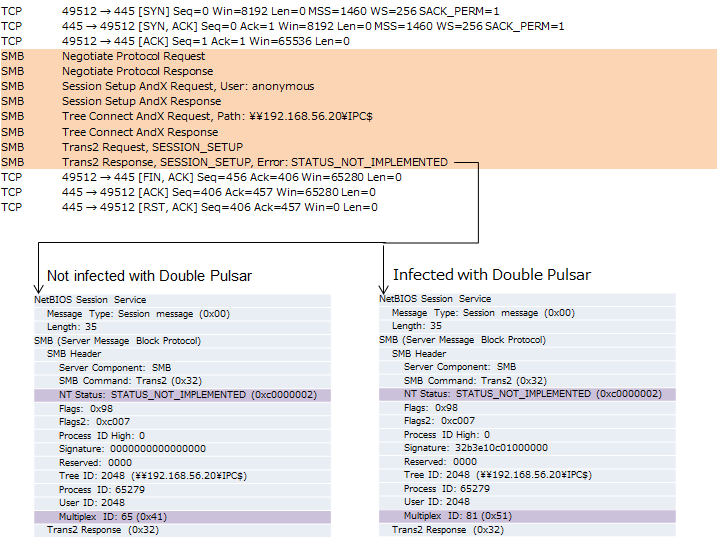 Figure 11: SMB connection flows containing the IP address (192.168.56.20) hardcoded in the malware
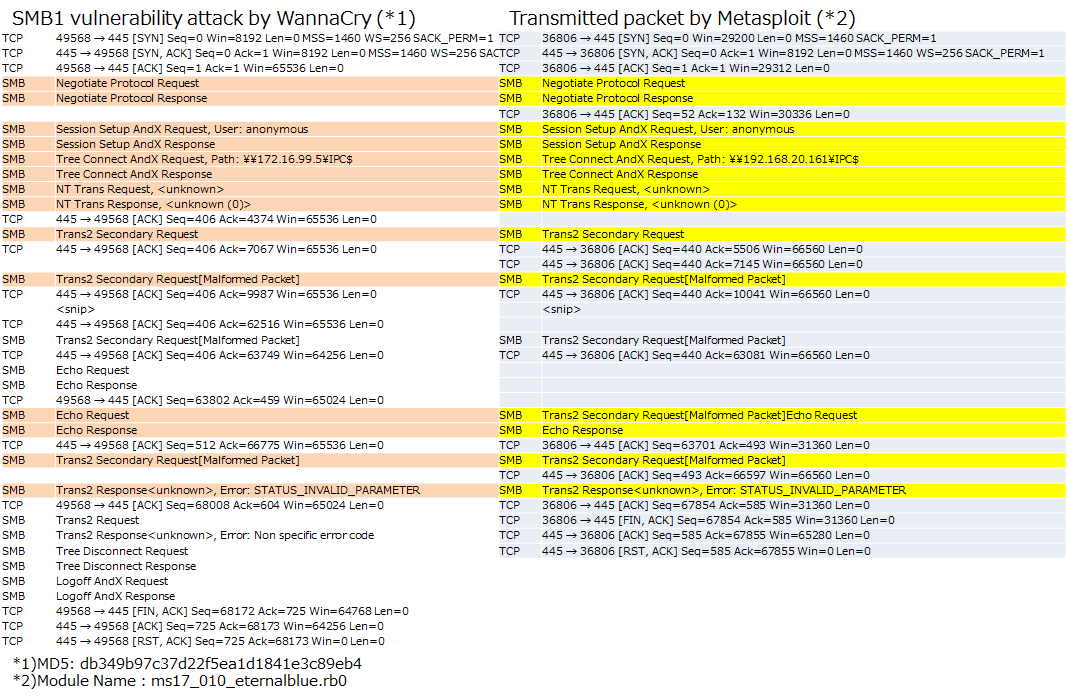 Figure 12: SMB connection flows containing the IP address (172.16.99.5) hardcoded in the malware
4.5 Verification by WannaCry and Metasploit module
Table 1 shows "Verification results of network infection by WannaCry(*1)", "Validation results by Metasploit(*2)" and "Report of infection status(* 3)" (as of May 23, 2017).
Table 1: Result of verification by WannaCry and Metasploit module
OS | by WannaCry(*1) | by Metasploit(*2) | Report of infection status(* 3) |
Windows XP 32bit | BSoD | - |
|
Windows XP SP2 32bit | BSoD | - |
|
Windows XP SP3 32bit | BSoD | - |
|
Windows Vista SP2 32bit | BSoD | - |
|
Windows 2003 SP2 32bit | BSoD | - |
|
Windows 7 SP0 32bit | Infected | - | Windows 7 x64: 60.35%
Windows 7 31.72%
Windows 7 Home x64: 3.67%
Windows 7 Home: 2.61% |
Windows 7 SP1 32bit | Infected | Failure | |
Windows 7 SP1 64bit | Infected | Success | |
Windows 2008 R2 64bit | Infected | Success | 2008 R2 Stardard x64: 0.71%
2008 R2 Enterprise x64: 0.56%
2008 R2 other than those above: 0.13% |
Windows 8.1 64bit | Not infected | Failure(*4) |
|
Windows 2012 R2 64bit | Not infected | Failure(*5) |
|
Windows 10 pro(Ver1607) 64bit | Not infected | Failure(*4) | Windows 10 x64: 0.03% |
*0)-:Uninvestigated
*1)MD5: db349b97c37d22f5ea1d1841e3c89eb4
*2)Module name: ms17_010_eternalblue.rb
*3)Kaspersky: Over 98% of All WannaCry Victims Were Using Windows 7
https://www.bleepingcomputer.com/news/security/over-98-percent-of-all-wannacry-victims-were-using-windows-7/
*4)Vulnerable in result of smb_ms17_010.rb
*5)Error occurred during Anonymous login
BSoD: Blue Screen of Death
5. Update history
October 10, 2017
- Add malware sample information to References.
June 19, 2017
- Add verification result of Windows 10 to References.
June 12, 2017
- This webpage was created and published.
Masato Terada (HIRT) and Naoko Ohnishi (HIRT)


